So, this one took me a while to figure out. None of the links I found while searching actually worked. Then while reading Microsoft Graph API The Power Platform on SharePains.com I saw a link to a YouTube video Pieter had embedded in the page. In the video, Deepak dropped a URI for the API call that saved my bacon, "_api/site/id". It was the missing link for me.
Instructions for creating a Power Automate workflow to Delete SharePoint Sites
- Create a new flow
- Use the When Power Apps calls a flow (V2) trigger

- Create one text parameter for the URL of the site to delete.

- Add a Send an HTTP request to SharePoint step
- In the site address pass the URL from Power Apps
- Method = GET
- URI = _api/site/id
- Headers = Accept application/json
- Add a terminate step and set its status to Cancelled.
- Test the flow.
- Go into the flow results and copy the body of the outputs from the HTTP call.

- Add a Parse JSON step
- For the body, select the body of the HTTP request
- Click the link to use a sample payload to generate schema
- Paste the copied text into the pop up box and click done.
- Move the terminate step below the parse JSON step.
- Save the flow.
- Test the flow automatically using the earlier flow trigger.
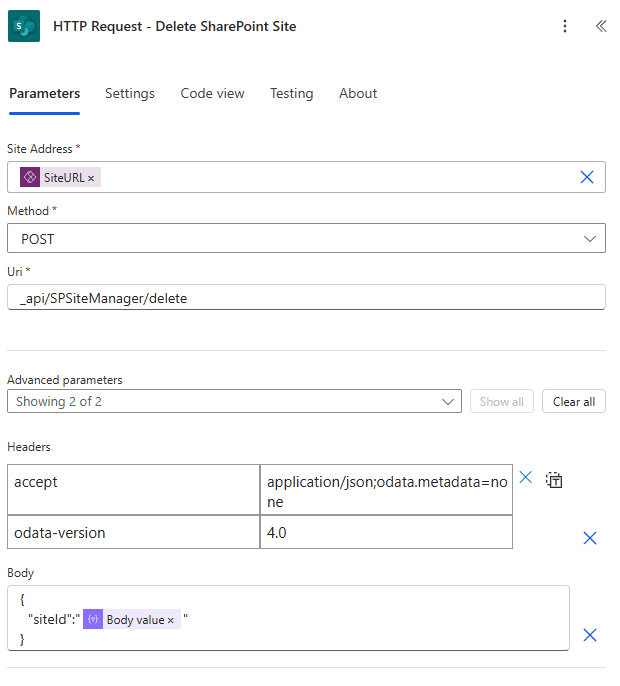
- Add a second Send an HTTP request to SharePoint step
- In the site address pass the URL from Power Apps
- Method = POST
- URI = _api/SPSiteManager/delete
- Headers = Accept: application/json;odata.metadata=none and odata-version: 4.0
- Body = {"siteId":"body('Parse_JSON')?['value']"}
- Delete the terminate step
- Save the flow.
